

 Honk
Honk
Pick a bill, toggle the facts, persuade with values.
How Honk Works
- Honk is a topic organizer that helps you become a citizen advocate. You can quickly understand a topic, make a quick phone call or email to put yourself on the record about the issue that matters, and be done in under five minutes. See interface diagrams (PDF).
- Your issue might be old growth logging, oil tankers in Hecate Strait, or Bills C-2 and C-12. Your voice is more powerful than email, more direct than social media. Your voice is as authentic as it gets.
- The campaigners we admire work on issues we care about every day. When they try to mobilize callers we want to join the charge, but it can take a long time to get up to speed. It's easier to score one for the team with a Honk.
- Use the dropdown to find a topic.
- Buttons open categories of information about a topic, such as what the issues are, when things are happening, who to call. The Message panel offers you a kind of script; phrases to choose from and a reminder of the Ask.
- Use the highlighter to select phrases you may want to use. Use the Notes category to write your ideas, or paste phrases from other pages. Select 'multiple categories' to keep several panes open at once.
- Let us know if this works for you and if it could be better at cartoonphysics@proton.me.

How It Works
Each topic in Honk is broken down into several categories. The default ones are:
- Summary: A brief introduction to the issue.
- Message: the most important talking points; the focal point of a phone call
- People: Key players in the issue, including a tool to find your local MP based on postal code.
- Notes: A space for users to add personal thoughts or notes.
- Timing: Important deadlines and processes to be aware of.
- Impacts: Potential consequences if the issue isn’t addressed.
- Context: Relevant background info to inform the discussion.
- Values: The core values at stake (e.g., privacy vs. security).
From the dropdown menu, select a Topic, such as ‘Bill C-2’. The category buttons below will now reveal information about that Bill alone. You’ll also find a help menu button beside the dropdown.
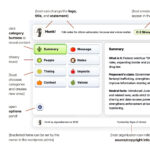
Tap category buttons such as ‘Description’, ‘Risks’ or ‘Values’ to get an outline of that aspect. Values-based discussions can be more persuasive than facts, so ‘Values’ are included as a standard category. Use the highlighter to mark the points that matter most to you. Use Notes to add your own text.
During a phone call, users may rely solely on the script if that’s easiest. Other users may want to preview the other categories of info for a well-rounded understanding of the issues before a call, or to reference a point during an encounter. In this way it might also be used during a speech or interview or spontaneous engagement.
The options panel is accessible from the gear icon at lower left. There you can enable ‘multiple selection’ mode, allowing you to open more than one information category at a time. You can show your notes window and the call script at the same time, for example. On desktop you can also enable ‘preview on hover’, which shows any category you hover over with your cursor until you move the cursor away.
Site owners can change the logo and title at the top, make any combination of topics and category information, create new categories, edit the text in any category and sort them in whatever order suits. You can put more than one honk widget on a website.